
Sjogren's World Chat with Opera
These are the instructions for the chat program that comes built into the free Opera browser. We are using the DALnet servers for our chat. You can get Opera at the Opera Web Site.
Download and install Opera. Open Opera.
Click Tools...
then click Mail and chat accounts:

A new window opens up. IT asks you about creating an account, click YES.

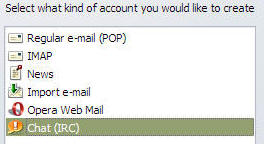
Select Chat (IRC) then click NEXT.
A window form pops up. Type in a name and an email address and click next.
Then the nickname box opens, so type in a unique nickname for yourself to be known by. Hint, the server is very large so you really should add numbers to your nickname or have something very unusual.
Now you will get the screen to choose an IRC server network. Click the dropdown and click DALnet North America and click finish.

Opera will automatically log you into DALnet and begin listing the thousands of rooms.
Our room is hidden and will not appear on the list. We do this for privacy so only people who know about it will join us.
Here is how to set up just the room you need to join Sjogren's World Chat:
Click CLOSE on that chatroom listing window.
Click Chat, New Room:

A window pops up. In the ROOM slot type #SjogrensWorld (the pound symbol and SjogrensWorld):
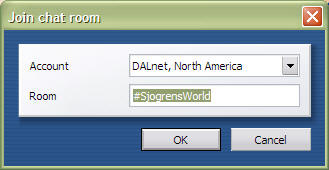
Then Click OK. Opera will automatically take you to our room, #SjogrensWorld. Just type in the bottom slot and send it to the room. You can see a list of people in the room on the right (yes, you only see me because I am not in there writing this during a regular chat time). It will look a little like this:

After this to go online, you simply at the top of Opera, click CHAT....Connect to DALnet. (It is a toggle switch, you click it to connect or to disconnect.)
If you click Tools, Toolbars, and always have panels showing, it will remember your #SjogrensWorld room, and you can double click that and get straight in to chat without having to click to connect.



